
Planning a trip can be exciting, but life doesn’t always go as planned. Sometimes, you need to cancel your travel arrangements, and if you’ve booked a car on Turo, you might be wondering how to go about it.
Whether it’s a change of schedule, an unexpected event, or simply a change of heart, knowing how to cancel your trip on Turo smoothly can save you from potential headaches. In this guide, you’ll discover the step-by-step process to cancel your booking on Turo effortlessly.
We’ll walk you through each stage, ensuring you’re well-prepared and stress-free. So, stay with us and learn how to handle your Turo cancellation like a pro, ensuring you’re ready for whatever comes next.
Credit: mobbin.com
Understanding Turo’s Cancellation Policy
Turo lets you cancel trips, but there are rules. Before booking, check the policy. Cancel early to avoid fees. Timing is important. Cancel 24 hours before the trip for no fees. Late cancellations might cost you money. The policy is strict. Make sure to read it carefully. Each trip has different rules. Look for cancellation details when you book. Ask questions if you don’t understand. Talk to Turo support if you need help. They can explain the policy. Always think ahead. Plan your trips wisely. This helps avoid surprises. Understand the rules to save money. Knowing the policy is smart. It helps you make good decisions.

Credit: www.reddit.com
Steps To Cancel A Trip
First, go to the Turo website. Use your usernameand passwordto log in. Make sure to enter the correct details. You should see your account page.
Find the reservationyou want to cancel. Look for the Tripstab on your account page. Click on it. You will see your current trips listed there.
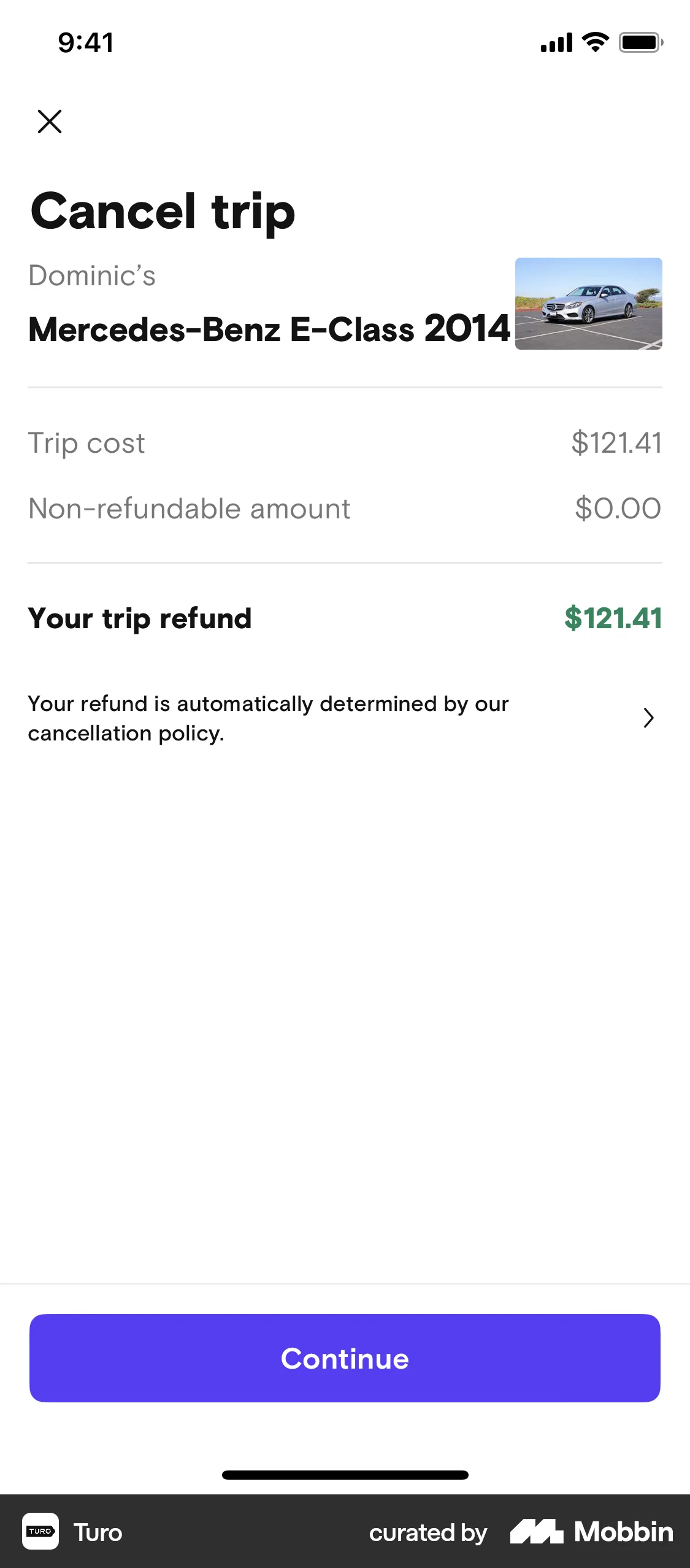
Select the trip you wish to cancel. Click on the Cancel Tripbutton. Follow the on-screen steps. Confirm your cancellation when asked. Your trip will be cancelled.
Refund Eligibility And Details
To get a full refund, cancel your trip more than 24 hours before it starts. The car should not be picked up yet. The booking must have been made less than 24 hours ago. If these conditions are met, you can expect your money back.
Cancelling less than 24 hours before the trip starts may lead to a partial refund. The car rental fee is refunded minus the first day’s charge. If the trip is canceled during the rental period, you only get money back for unused days.
No refundis given if the trip is canceled after it begins. If the car is picked up, the payment stands as is. Also, bookings over 24 hours old, before cancellation, may not qualify for refunds.
Handling Cancellations From The Host
Turo makes trip cancellations straightforward. Log in, find your trip, and select ‘Cancel Trip’. Follow the prompts to confirm cancellation. Keep an eye on any cancellation fees that may apply. Ensure you check the host’s cancellation policy before finalizing.
Host-initiated Cancellations
Hosts on Turo may need to cancel a trip. Sometimes, a car has issues or there’s a scheduling conflict. Hosts should inform guests quickly. They must provide a reason for the cancellation. This helps guests understand the situation.
Hosts can suggest alternative arrangements. For instance, they might offer another car. This keeps the guest’s plans on track. It is important to keep communication clear and simple. Guests appreciate honesty and helpful solutions.
Alternative arrangementscan be a good solution. Guests stay happy when they get a quick fix. A smooth process helps everyone. Remember, it’s about making the guest’s experience better.
Common Issues And Solutions
Canceling a trip on Turo can be tricky due to policies. Check the cancellation deadline in your booking details. Follow Turo’s instructions, and ensure you notify the host promptly to avoid fees.
Technical Glitches
Turo’s app may have bugs sometimes. Restart the app first. Check your internet connection. Try using a different device. Clear the app’s cache. These steps often fix simple problems. If the issue persists, contact Turo support for help. They can guide you further.
Policy Disputes
Understand Turo’s policies well. Sometimes, users face disputes over cancellation. Always read terms before booking. If there’s a dispute, gather all related information. Email Turo support with details. Explain your side clearly. They will review and respond.
Customer Support Options
Turo offers various support channels. Use their live chat for quick help. Email support is available for detailed queries. Phone support can resolve urgent issues. Check their FAQ section. Many common questions are answered there. Always keep your booking details handy.
Tips For A Smooth Cancellation Experience
Canceling a trip on Turo? First, log into your account. Next, navigate to your trips. Then, select the trip you want to cancel. Follow the prompts to complete the cancellation. Check Turo’s cancellation policy for any fees or refund eligibility.
Contact Turo support if you face issues.
Timely Cancellations
Cancelling early is best. Notify your host as soon as possible. This gives everyone time to adjust. Last-minute cancellations can cause problems. Plan ahead and avoid delays. Check Turo’s policy for any fees. Early action can save you money.
Clear Communication With Host
Talk to your host clearly and politely. Explain why you need to cancel. They may offer help or solutions. Be honest and respectful. Check messages often. This shows you care about their time. Good communication is key for a smooth process.

Credit: www.reddit.com
Frequently Asked Questions
How Do I End A Trip On Turo?
To end a trip on Turo, return the vehicle to the agreed location. Ensure it’s clean and refueled. Check for any damages and take photos. Communicate with the host to confirm the trip’s completion. Review and rate your experience on the Turo app.
How Soon Does Turo Refund A Cancelled Trip?
Turo typically processes refunds within 24 hours after a trip is canceled. It might take 3-5 business days for the funds to appear in your account, depending on your bank or payment method. Always check with your financial institution for exact timing.
What Happens If I Decline A Trip On Turo?
Declining a trip on Turo won’t affect your account negatively. The reservation will be canceled automatically. You can decline for various reasons, like unavailability or concerns. Ensure your calendar is updated to prevent frequent declines. Consistent declines might affect your listing’s visibility.
Keep communication clear with renters.
How Do I Refund A Guest On Turo?
To refund a guest on Turo, navigate to the trip details in your account. Select “Issue Refund” and follow the prompts. Ensure the refund is processed within the appropriate timeframe for customer satisfaction. Always check Turo’s refund policies for any specific conditions or guidelines.
Conclusion
Canceling a trip on Turo is straightforward. Follow the steps carefully. Log in to your account and navigate to your bookings. Select the trip you want to cancel. Click on the cancellation option. Confirm your choice. Ensure you understand the cancellation policy.
Refunds may vary based on timing. Always review terms before booking. This prevents surprises later. Stay informed. With these steps, managing your Turo trips becomes easier. No stress involved. Clear actions lead to smooth experiences. Enjoy your future travels on Turo without worry.