
Are you planning an international adventure but worried about staying connected with your Verizon plan? You’re not alone.
Many travelers face the daunting task of figuring out how to use their cell service abroad without incurring sky-high fees. But don’t worry—you’re about to discover simple, effective steps to ensure your phone works seamlessly while you’re exploring the world.
Imagine sharing breathtaking photos in real-time, keeping in touch with loved ones, and having reliable GPS navigation, all without the stress of unexpected charges. Dive into this guide to unlock the secrets of using Verizon internationally, and make your travel experience as smooth as possible.
Research Verizon’s International Plans
Find the best Verizon international planfor your trip. Start by checking their TravelPassoption. It allows you to use your phone like at home. Pay a daily fee to access calls, texts, and data. Another choice is the Monthly International Plan. It’s good for longer trips. The plan gives you a set amount of data, calls, and texts.
Check your destination’s compatibility with Verizon. Not all countries are covered. Look for coverage maps on their website. Understand what services you can access while abroad. Contact Verizon support if you have questions. They can explain details and help you choose.
Explore Travelpass Options
Verizon offers TravelPassto keep you connected abroad. It lets you use your phone just like at home. You pay a daily fee and use your phone normally. Calls, texts, and data work like usual. Simple, right? No confusing plans. Just pay and go. Make sure your phone is compatible. Some old models may not work. Before leaving, check your settings. Enable roamingfor TravelPass to work. Always know how much data you use. Extra data can cost more. Keep track to save money. Traveling should be fun, not stressful.
Check Device Compatibility
Before you travel, check if your Verizon deviceworks abroad. Different countries use different network frequencies. Not all devices support these frequencies. Visit Verizon’s website for a compatibility list. You can also call their support for help. Your device might need unlockingfor international use. Check if your SIM cardworks in other countries. Verizon offers international plans. These plans help reduce roaming charges.
Some devices need special settings. You can find these settings in your phone’s menu. Make sure your phone has updated software. New updates often fix compatibility issues. Check if your phone can use local SIM cards. Local SIM cards can be cheaper for calls. Always have a backup plan. Carry an extra battery or charger. Keep your phone safe from theft.

Credit: www.amazon.com
Set Up Your Phone For International Use
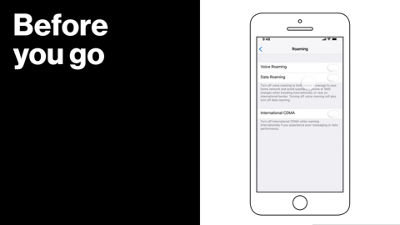
To use your phone abroad, enable international roaming. This lets your phone connect to networks in other countries. Verizon offers plans for this service. Check your plan to see if roaming is included. Some plans offer free texting and data. Others might charge you extra. Always check the costs before you travel. You can enable roaming in your phone’s settings. Look for network settings. Then turn on roaming. This ensures your phone works everywhere. If roaming is off, your phone won’t connect abroad.
Network settings need adjustment for better service abroad. Switch to global mode in your phone settings. This helps your phone find networks easier. Sometimes, you may need to manually select a network. This ensures you get the best connection available. If your phone struggles to connect, restart it. A quick restart can fix connection issues. Keep an eye on your signal strength. This tells you how well your phone connects. Strong signal means better calls and internet use.
Manage Data Usage
Monitor data consumptionto avoid high charges. Check your phone settings. See how much data you use. Apps often run in the background. They can eat up your data. Turn off apps that you don’t need. This will save your data. You can set data limits on your phone. This will alert you when you reach your limit. It’s a good idea to keep an eye on your data usage.
Use Wi-Fi hotspotswhenever possible. They help you save data. Many places offer free Wi-Fi. Coffee shops, libraries, and airports often have Wi-Fi. Connect your phone to these hotspots. This way, you won’t use your mobile data. Always check if the Wi-Fi is safe. Public Wi-Fi can be risky. Use it wisely to keep your data secure.
Handle Call And Text Charges
Wi-Fi Callinghelps save money on calls and texts. It uses the internet instead of mobile networks. Connect to a strong Wi-Fi signal. Make calls and send texts like at home. Remember to turn off cellular data.
Using Messaging Appsis another great way to communicate. Apps like WhatsApp and Viber are popular. They use Wi-Fi or data to send messages. Many people use them worldwide. They are often free to download. Keep in touch without extra charges.
Consider Local Sim Cards
Local SIM cardscan save you money on calls and data. They offer cheaper rates than roaming with your current provider. You can enjoy better network coverage in the country you visit. This is helpful for using maps and staying connected. No more worrying about high phone billswhen you return home.
Benefits Of Local Sims
Using a local SIM card lets you call locals at lower costs. Internet speed may be faster with a local network. You get a local number, making it easier for people to reach you. Local SIMs are often prepaid, so you control your spending.
How To Purchase And Use
Buying a local SIM card is simple. Find them at airports, shops, or kiosks. Bring your passport for registration. Insert the SIM into your phone. Follow instructionsto activate it. Top-up credit as needed. Enjoy your travels without stress!
Credit: www.verizon.com
Utilize Verizon’s Support Resources
Traveling abroad can be exciting. Verizon offers helpful support resourcesfor travelers. Check Verizon’s website before you go. They have a section for international travelers. It offers information on international plans. You can find details about data, calls, and texts. Customer serviceis available if you need assistance. They are ready to answer questions about your plan. Use the Verizon app to manage your account. It’s easy and quick. The app helps track your usage. You can also find local store locations. This is useful in case you need in-person help. Remember to check for any updates before you leave. Being prepared makes travel smoother.
Protect Your Device And Data
A VPN is like a secret tunnel. It hides your online steps. VPNs protect your data from bad people. They help keep your information safe. Public Wi-Fi is not safe. It can be risky. Hackers can steal data from your device. Always use a VPN on public Wi-Fi. This makes it harder for hackers.
Always lock your phone. Use a strong password. Passwords keep your phone safe. Never leave your device alone. Always keep it close. Avoid sharing your phone with strangers. Sharing can lead to security risks. Be careful with unknown apps. Some apps can be bad. Only download apps from trusted places.
Credit: www.verizon.com
Frequently Asked Questions
Do I Need To Let Verizon Know I Am Going Out Of The Country?
Yes, notify Verizon before traveling abroad. They can help with international plans to avoid extra charges. Check their website for details on coverage and rates in your destination country. Enable international roaming to ensure seamless connectivity while traveling.
How Do I Set Up International Travel With Verizon?
Contact Verizon to activate international travel service. Check available plans and options. Enable roaming in settings.
How Do I Avoid Verizon Charges When Traveling Internationally?
Turn off data roaming on your phone. Use Wi-Fi for internet access. Purchase a local SIM card. Consider Verizon’s TravelPass or International Plan for affordable rates.
Conclusion
Traveling internationally with Verizon can be hassle-free. Plan ahead. Check your options and choose a suitable plan. Avoid unexpected charges. Keep your phone ready for international use. Explore Verizon’s services for travelers. Stay connected easily and enjoy your trip. Safe travels and smart choices make a difference.
Remember to keep your phone charged. Enjoy your adventures around the world. Don’t forget to share your experiences with friends and family. Verizon offers reliable options for every traveler. Embrace new cultures and stay connected. Your journey awaits!