
Ever finished an Uber ride and realized you left something important behind? Or perhaps you need to clarify a detail about your trip.
You’re not alone. Many passengers find themselves needing to contact their Uber driver after their journey. Whether it’s retrieving a lost item or resolving a query, knowing the steps to follow can save you time and stress. Imagine the relief of quickly solving your issue without hassle.
In this guide, you’ll discover exactly how to reach out to your Uber driver after your ride, ensuring you get the help you need promptly. Stay with us to learn the straightforward steps that will empower you next time you need to make contact.
Credit: www.businessinsider.com
Using The Uber App
Open the Uber app on your phone. Tap on the menu icon. Go to Tripsor Your Trips. Find the trip you need. It’s usually the last one. Tap on the trip to see details.
Look for the driver’s name. You will see the driver’s photo. Check for the car details. Tap on Contactor Message. You can send a message. You can call directly. Follow instructions on the screen.
Contacting For Lost Items
If you forget an item in your Uber, don’t worry. Uber has a way to help. First, open the Uber app. Tap on the menu, then select “Your Trips.” Find the trip where you lost the item. Tap on “I lost an item.” Follow the steps to report the lost item. You will need to enter details about your item. This helps the driver find it quickly.
Once you report the lost item, Uber will contact the driver. The driver might call you to arrange a meeting. Make sure your phone number is correct in the app. Sometimes, you may need to pay a small fee for the driver to return the item. This fee is for their time and effort. Stay polite and patient during this process. Communication helps you get your item back fast.
Contacting For Feedback
Uber values your feedback. After each ride, you can rateyour driver. Open the app and find the trip in your history. You will see a place to give stars. Give stars from one to five. Share your thoughtsabout the trip. Tell about the driver’s behavior, car cleanliness, and driving skills. Your feedback helps Uber improve.
Sometimes you want to contact the driver again. Maybe you left something in the car. Use the app to send a message. Go to your trip history and click on your last ride. You will see a button to contactthe driver. Use the form to write your message. Explain what you need. The driver will respond soon. This way, you can solve any trip issues easily.

Credit: www.youtube.com
Utilizing Uber Support
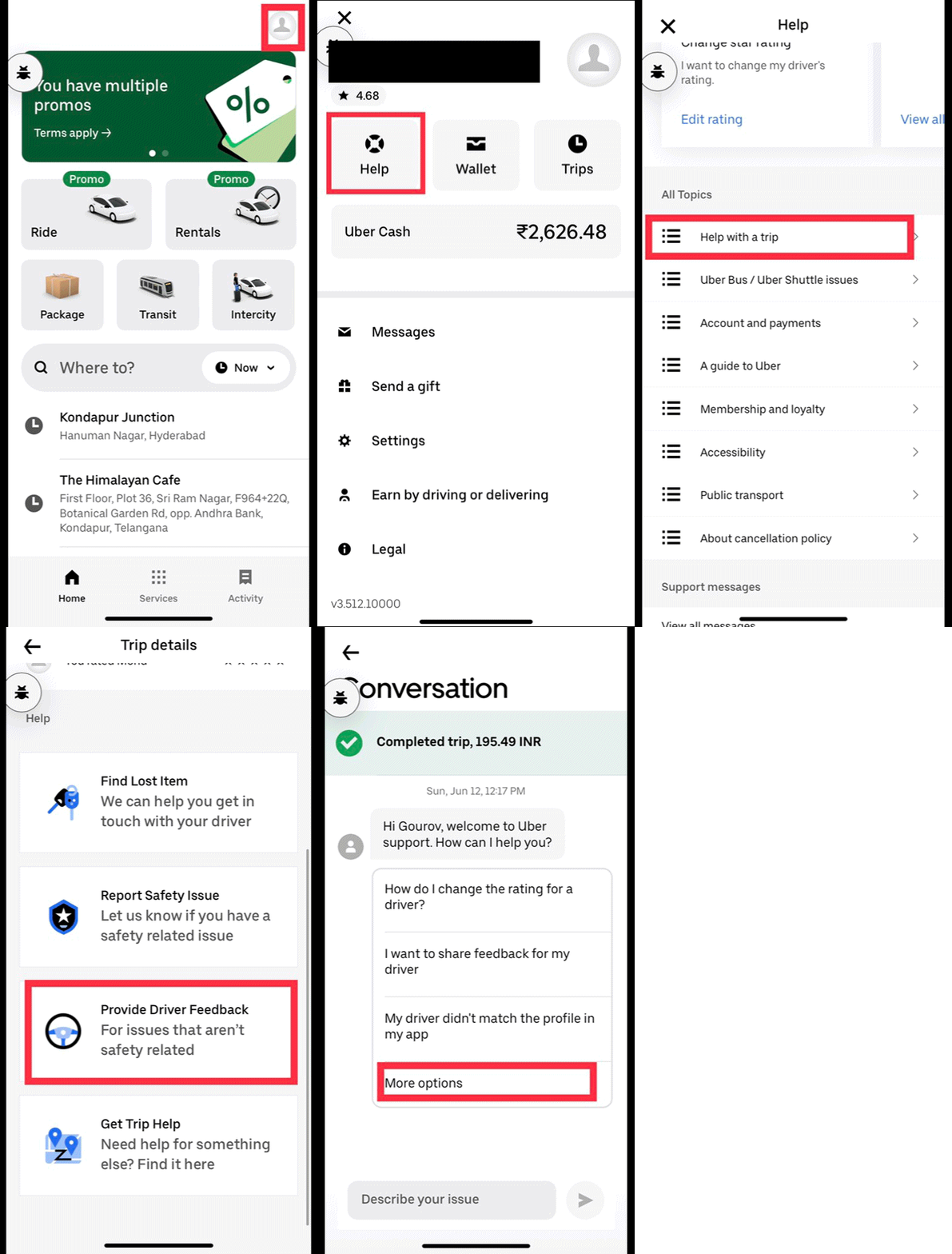
Tap on the menu icon in the Uber app. Choose the Help section. It lists common issues. Find your problem there. The section has answers. Simple steps to follow. Easy to understand instructions.
Open the Uber app. Navigate to Help. Tap on Contact Support. Fill the form with details. Add your trip information. Submit your request. Wait for a response. Uber team will reply soon.
Privacy And Safety Considerations
Keep your personal informationsafe. Do not share phone numbers. Use Uber’s app for communication. It keeps your details private. Drivers cannot see your number. You cannot see theirs. It’s important to use secure methodsof contact.
Uber provides in-app messaging. It’s safe and secure. Messages stay within the app. This ensures safe communication. Avoid direct calls or texts. They can expose your number. If you need to talk, use the app. It helps keep you protected.
Credit: www.uber.com
Alternatives For Contact
You can try using social mediato find your Uber driver. Platforms like Facebookor Twittermight help. Search for the driver’s name. You can send a polite message. Explain why you need to contact them. Keep your message short and clear.
If you have the driver’s email, you can send a message. Write a polite emailexplaining your reason. Keep your email short. Use simple words. Be clear about what you need. You might need to wait for a reply. Be patient and courteous in all messages.
Frequently Asked Questions
Can You Message An Uber Driver After The Ride?
No, you cannot message an Uber driver after the ride. The app only allows communication during the trip. For any issues or forgotten items, use the Uber app’s help section to contact support.
How Do I Contact Uber After A Trip?
Open the Uber app and go to ‘Your Trips. Select the trip and tap ‘Help’. Follow the prompts to contact support.
How To Get Hold Of Uber Driver After Ride?
Contact your Uber driver through the app. Select the trip, click “Help,” and choose “Contact driver. ” Ensure privacy by using Uber’s anonymized calling feature.
How Do I Get Into Contact With An Uber Driver?
Contact your Uber driver through the app by tapping “Contact” on the trip details. You can call or message them directly. Ensure your app notifications are enabled for real-time updates and communication. Always follow safety guidelines while interacting with drivers.
Conclusion
Reaching your Uber driver post-trip is simple. Use the Uber app’s features. Check your trip history for necessary details. Contact support if needed. Always ensure your safety. Respect privacy guidelines while communicating. These steps help resolve any post-trip concerns. The process remains straightforward.
Keep these tips handy for future rides. Enjoy stress-free Uber experiences. Stay informed and prepared for any situation. Your understanding of Uber’s contact methods ensures peace of mind. Feel confident and secure with every ride. Safe travels always!