
Have you ever found yourself staring at your car’s dashboard, unsure how to switch from the trip meter to the odometer? You’re not alone.
Knowing how to quickly toggle between these two readings can save you time and help you keep better track of your driving. Whether you’re checking your total miles or measuring a specific trip, this simple skill makes a big difference.
Keep reading, and you’ll learn exactly how to make the switch in just a few easy steps. Your dashboard will never confuse you again.

Credit: www.youtube.com
Trip Meter Vs Odometer
The trip metermeasures the distance of a single trip or journey. It can be reset anytime to track new trips. The odometershows the total distance a vehicle has traveled since it was made. It cannot be reset.
The trip meteris useful for tracking short distances like daily drives or fuel efficiency. The odometerhelps keep track of the vehicle’s overall usage for maintenance and resale value.
| Feature | Trip Meter | Odometer |
|---|---|---|
| Purpose | Measures distance for individual trips | Measures total distance traveled |
| Reset | Can be reset anytime | Cannot be reset |
| Use | Track short distances or fuel use | Track vehicle lifespan and maintenance |
Locating The Controls
Most cars have dashboard buttonsto switch between trip meter and odometer. These buttons are usually near the speedometer or fuel gauge. Look for a button labeled “Trip”or “Reset”. Pressing it once or holding it down changes the display. Sometimes, pressing the button repeatedly cycles through different screens.
Steering wheel optionsare common in newer cars. Buttons on the steering wheel let drivers switch displays without taking hands off the wheel. Look for arrows or a menu button. Use these buttons to navigate through the digital display. The odometer and trip meter will appear as choices on the screen.
Switching Methods
Switching from the trip meter to the odometer is quick and simple. Press the button near your dashboard display until the odometer reading appears. This lets you see the total distance your vehicle has traveled.
Manual Button Press
Find the button near your vehicle’s dashboard. It’s often labeled as “Trip” or “Mode”. Press the button gently. Watch the screen change from trip meter to odometer. If it doesn’t change, press again until it does. Keep your eyes on the road while pressing. This method works in most cars. Check your car’s manual if unsure.
Using Vehicle Settings Menu
Start by turning on the ignition. Look for the vehicle’s settings on the dashboard screen. Use the control knob or buttons to navigate. Find the option for display settings. Select the odometer from the menu. Confirm your selection by pressing the OK button. The screen should now show the odometer reading. If not, repeat the steps or consult your manual.
Resetting The Trip Meter
Resetting the trip meterhelps track your trip distance accurately. It should be reset before starting a new journeyor after refueling. This way, you can measure how far you have traveled during that specific trip.
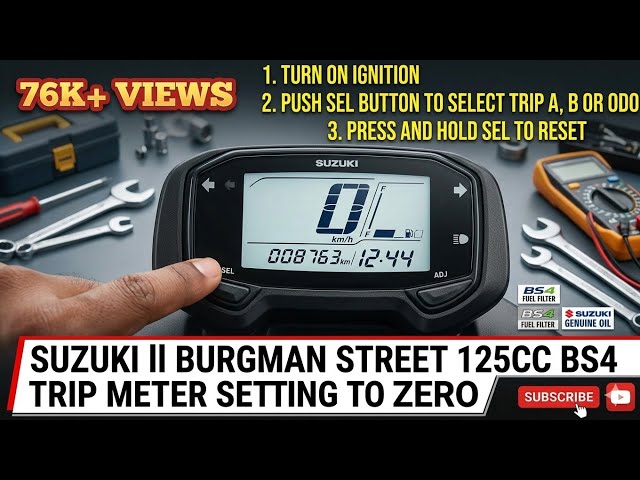
To reset the trip meter, locate the trip meter button on your vehicle’s dashboard. Press and hold the button for a few seconds. The numbers will return to zero, showing the reset is complete. Some vehicles may require you to press the button twice or cycle through different modes before reset.
Always check your vehicle’s manual for exact instructions, as controls vary. Resetting regularly keeps your travel data clear and useful.
Troubleshooting Issues
Unresponsive buttons often happen because of dirt or wear. Try gently cleaning around the buttons with a soft cloth. Press each button firmly but do not force them. Sometimes, a quick reset of the car’s system can fix the issue. Check your car manual for reset instructions.
Display errors may show wrong numbers or no numbers at all. This can happen due to low battery or a loose connection. Check the battery level and replace if needed. Also, inspect wiring or connectors behind the dashboard for any damage.
| Problem | Possible Cause | Simple Fix |
|---|---|---|
| Unresponsive Buttons | Dirt or wear | Clean buttons, press firmly, reset system |
| Display Errors | Low battery or loose connection | Check battery, inspect wiring |

Credit: www.youtube.com
Tips For Effective Use
Switching between trip meter and odometerhelps track your car’s journey better. The trip meter measures distance traveled per trip, useful for short trips. The odometer shows total distance since the car was new.
Tracking fuel efficiency becomes easier by resetting the trip meter after each refill. This way, you can see how many miles you drove on one tank. It helps spot if your car is using too much fuel.
- Reset trip meter at every fuel fill-up.
- Note miles driven and fuel added.
- Calculate miles per gallon or kilometer per liter.
Planning trips gets simpler with the trip meter. You can check the distance to your destination. It helps estimate travel time and fuel needs.
Credit: www.youtube.com
Frequently Asked Questions
How Do I Switch From Trip Meter To Odometer?
To switch, locate the button on your dashboard or steering wheel. Press it until the display changes from trip meter to odometer. This process varies by vehicle model, so check your owner’s manual for specific instructions.
Can I Reset The Trip Meter Without Affecting The Odometer?
Yes, resetting the trip meter does not affect the odometer reading. The trip meter tracks distance for individual trips, while the odometer records total mileage permanently.
Why Switch Between Trip Meter And Odometer?
Switching lets you track total vehicle mileage or distance traveled during a specific trip. This helps with fuel management, maintenance scheduling, and trip planning.
Is Switching Meters The Same For All Cars?
No, switching methods differ by car make and model. Some use buttons, others use touchscreen menus. Always consult your vehicle’s manual for exact steps.
Conclusion
Switching from trip meter to odometer is simple and quick. Just follow the steps carefully. This helps you track your total distance easily. Knowing how to switch saves time during your drive. Practice a few times to feel confident. Your car’s display shows both readings clearly.
Use this skill whenever you need to check your distance. Keeping an eye on the odometer helps with maintenance and travel plans. Now, you can switch between trip meter and odometer with ease.