
Are you ready to build a hotel booking website that stands out and attracts visitors? Creating a site like this can seem tricky, but with the right steps, you can make it simple and effective.
Imagine having a platform where travelers find their perfect stay with just a few clicks—your site can do exactly that. You’ll discover clear, easy-to-follow tips to design a hotel booking website that works smoothly and keeps customers coming back. Let’s dive in and turn your idea into a powerful online booking tool.
Planning Your Website
Understanding the target audienceis key to building a useful hotel booking site. Focus on who will use your website. Are they business travelers, families, or tourists? Knowing this helps tailor the site’s design and features.
Choosing the right key featuresimproves user experience. Essential features include:
- Easy-to-use booking system
- Clear room descriptions and photos
- Secure payment options
- Customer reviews and ratings
- Mobile-friendly design
Researching competitors shows what works well in the market. Notice their strengths and weaknesses. Use this info to make your website better and unique.
Designing The User Interface
Wireframes act as the blueprintfor the website layout. They show where each elementwill go. Keep wireframes simple to focus on structurewithout colors or images.
Choose a color schemethat fits the hotel’s brand and mood. Soft blues and warm neutrals often work well. Pick fontsthat are easy to read on all devices. Use one font for headings and another for body text.
Mobile responsiveness means the site looks good on phones and tablets. Use flexible layouts and images that scale. Test the design on different screen sizes to ensure smooth navigationand readability.
Setting Up The Backend
Choosing the right technology stack is keyfor a smooth backend setup. Popular options include Node.js, Python with Django, and Ruby on Rails. These provide good support for building booking systems.
Database design should focus on storing hotel details, room availability, and user bookings. Using relational databaseslike MySQL or PostgreSQL helps manage complex data well.
| Table | Fields | Description |
|---|---|---|
| Hotels | HotelID, Name, Location, Description | Stores hotel information |
| Rooms | RoomID, HotelID, Type, Price, Availability | Details of each room |
| Bookings | BookingID, UserID, RoomID, CheckIn, CheckOut | Tracks user bookings |
User authentication secures the site and protects user data. Implementing loginand registrationwith email and password is common. Adding password hashingkeeps passwords safe.

Credit: www.youtube.com
Integrating Booking System
Real-time availability managementshows room status instantly. It avoids double bookings and keeps data updated. Synchronize your system with multiple platforms to manage all bookings in one place. This saves time and reduces errors.
Payment gateway integrationallows secure online payments. Choose popular gateways like PayPal or Stripe for trust. Ensure the system supports multiple payment methods. Security is key, so use SSL encryption and comply with PCI standards.
Booking confirmation and notificationssend instant emails or SMS to customers. Confirmations include booking details and cancellation policies. Automated reminders reduce no-shows and improve customer experience. Notifications also alert staff about new bookings.
Adding Essential Pages
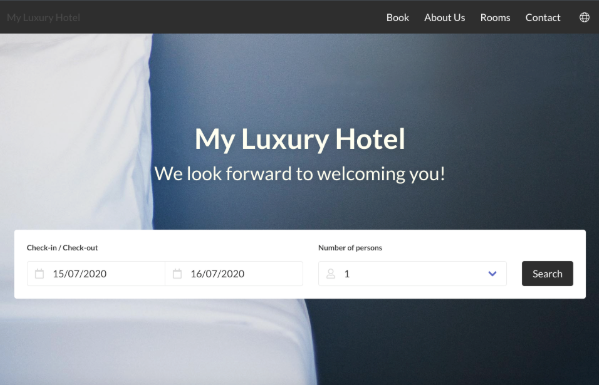
Room listingsshould show clear photos, prices, and features. Use simple language to describe room types and amenities. Let visitors know about availability and special offers.
About Uspage tells visitors who runs the hotel. Share your story, mission, and values. This helps build trust and connect with guests.
Contact Informationmust be easy to find. Include phone numbers, email, and address. Add a map for better location understanding.
Customer reviewsand testimonials show real guest experiences. Display honest feedback to help new visitors decide. Positive words build confidence and trust.
Credit: sirvoy.com
Optimizing For Seo
Keyword researchhelps find words travelers use most. Focus on terms like hotel booking, cheap stays, and room reservations. Use tools to discover popular and easy-to-rank keywords. Include these in titles, descriptions, and content.
On-page SEO techniquesboost your site’s visibility. Use clear alttags for images describing hotel photos.
Improving site speedkeeps visitors happy. Compress images to load faster. Use fast hosting services. Minimize code by removing extra spaces or comments. Enable browser caching so pages load quickly on repeat visits.
Testing And Launching
Test your hotel booking website thoroughly to find and fix errors before launch. Ensure all booking features work smoothly for a better user experience. Launch the site only after confirming it runs well on different devices and browsers.
Cross-browser Testing
Ensure your website works well on all popular browsers. Check Chrome, Firefox, Safari, and Edge. Test both desktop and mobile versions. Look for layout issues, broken links, and slow loading times. Fix any bugs found to provide a smooth experience for all users.
User Experience Testing
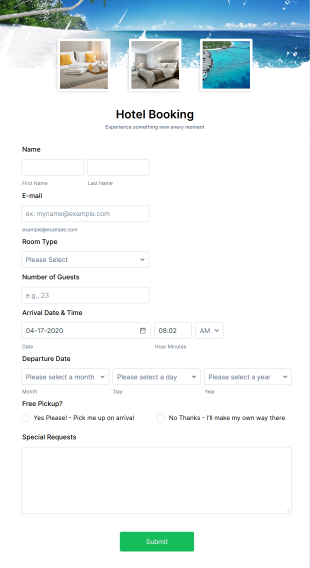
Ask real users to try your site. Watch how easily they find rooms and make bookings. Note any confusion or delays. Improve navigation, buttons, and forms based on feedback. Make sure the site is fast, clear, and simple to use.
Deploying The Website
Choose a reliable hosting service. Upload your website files and database. Set up domain name and SSL certificate for security. Test the live site for any final issues. Monitor site performance and fix problems quickly after launch.
Credit: www.jotform.com
Maintaining And Updating
Regular content updates keep the website fresh and useful. Change hotel deals, add new photos, and update room details. Fresh content helps visitors find current information and boosts search rankings.
Security monitoring protects user data and keeps the site safe. Use tools to watch for threats and fix issues quickly. Secure sites build trust with visitors and avoid data breaches.
Analyzing user feedback helps improve the site’s experience. Read reviews, surveys, and comments carefully. Fix problems and add features users want. This makes the booking process easier and more enjoyable.
Frequently Asked Questions
What Essential Features Should A Hotel Booking Website Have?
A hotel booking website needs user-friendly search filters, secure payment options, real-time availability, and customer reviews. Mobile responsiveness and easy navigation enhance user experience. These features ensure smooth booking and increase customer trust.
How To Choose The Best Platform For Hotel Booking Site?
Select a platform based on ease of use, scalability, and integration options. Popular choices include WordPress with booking plugins or custom development for advanced features. Ensure it supports secure payments and mobile compatibility.
How To Integrate Payment Gateways Securely On The Website?
Use trusted payment gateways like PayPal, Stripe, or Square. Implement SSL certificates and encryption to protect user data. Regularly update your system to prevent vulnerabilities and maintain customer trust.
What Seo Strategies Improve Hotel Booking Website Visibility?
Optimize site speed, use relevant keywords, and create quality content. Include meta tags, alt texts, and local SEO tactics. Regularly update listings and encourage user reviews to boost search rankings.
Conclusion
Creating a hotel booking website takes clear planning and simple steps. Choose the right tools and design for easy navigation. Keep your site fast and mobile-friendly to attract more users. Offer clear information about rooms, prices, and services. Test your website often to fix any problems quickly.
A good booking site builds trust and helps customers book with ease. Start small, then improve your site over time. Stay focused on user needs to grow your online presence. Your hotel booking website can succeed with patience and care.